
In Woodcock-Johnson IV (WJ IV), In WJ IV, only an account holder can add administrators. Both account holders and administrators can add examiners. Before You Begin: Compile names and email addresses of the WJ IV administrators and examiners to add.
Before You Begin: Compile names and email addresses of the WJ IV administrators and examiners to add.
1. Sign in to https://www.riversidescore.com using your user name and password. The Riverside Score Dashboard appears.
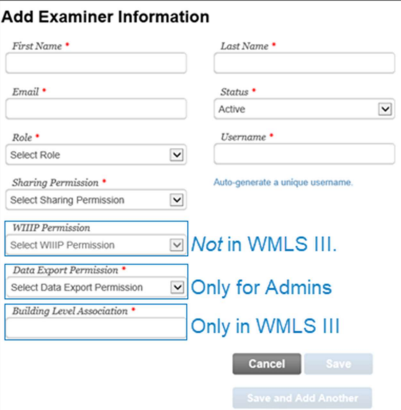
2. In the header, move the pointer over the Administration tab, select Manage Examiners and click Add. The Add Examiner Information page appears.
3. Enter the following information. Fields with an asterisk ( * ) are required.
-
*First and Last Name
-
*Email
-
*Status: Active allows a user to access OS&R
-
*Role: See Roles and Permissions for role details
-
*Username: Type a unique username or click Auto-generate a unique username.
-
*Sharing Permissions: Enables or disables a user’s ability to share examinees or test records with other administrators and examiners
-
Woodcock Interpretation and Instructional Interventions Program (WIIIP) Permission (not available in Woodcock-Muñoz Language Survey [Woodcock-Muñoz Language Survey III (WMLS III)])
-
*Data Export Permission (Admins only): Allows or disallows an admin to run a data export
-
*Building Level Association (WMLS III only): Identifies buildings a user is associated with for organizational reporting
4. Click Save and Add Another to enter additional users or click Save to end the process to add users.
Note: A newly added administrator or examiner receives an email providing a user login name and a link to create a password. The link opens Riverside Score in the user’s default browser.
Roles and Permissions
-
Account Holder: The account holder is the primary contact for Riverside Score with permissions to perform all tasks in Riverside Score, including the following.
Note: Only one user can be assigned the account holder role, although WMLS III allows for a secondary account holder.
-
Add administrators and examiners
-
Review caseload folders of all administrators and examiners in the organization
-
View all examinees and test records in an organization
-
Administrator (Admin): An admin holds all the permissions of an examiner as well as the following.
-
Add examiners
-
Review caseload folders of all examiners in the organization
-
Examiner: The examiner is the basic user role with permission for the following.
Note: An examiner can access only their own caseload folders.
-
Add caseload folders, examinees, and test records
-
Record test results
-
Create reports