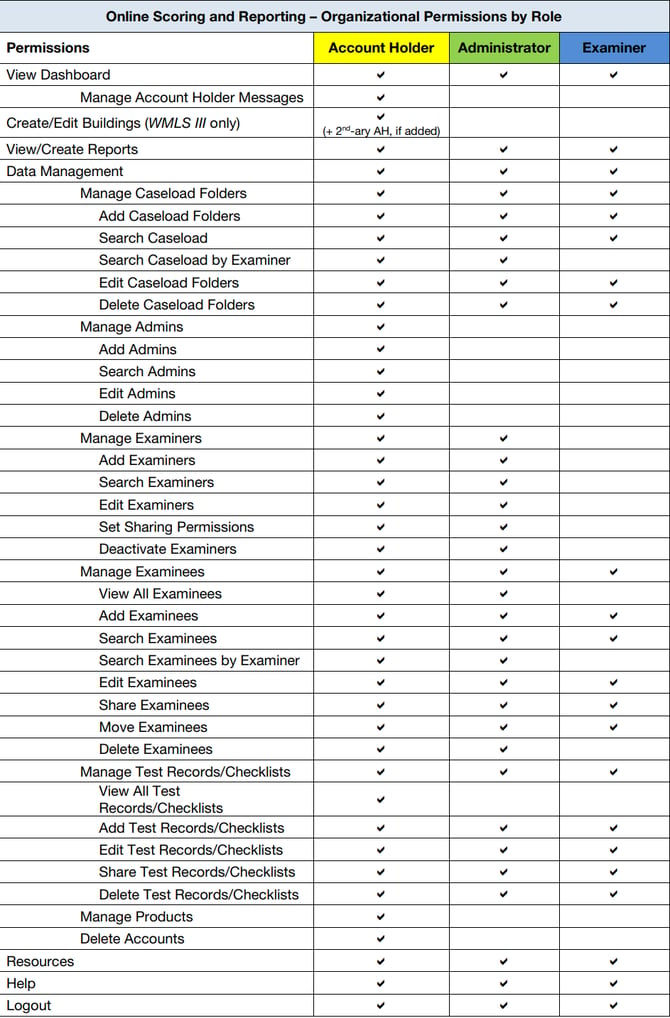
Riverside Score uses role-based permissions to control what each user can access and manage within a Woodcock-Johnson IV (WJ IV) organization. Each role is designed to provide the level of access needed based on the user's responsibilities.
Examiner
The Examiner role is intended for users who administer and score assessments.
Examiners can:
- Create and manage their own caseload folders.
- Add and manage examinees.
- Create, edit, and score test records.
- Generate reports.
- Access caseload folders that have been shared with them by an administrator or another examiner.
Examiners cannot manage staff accounts or organization-wide settings.
Administrator
The Administrator role includes all Examiner permissions, plus additional management capabilities.
Administrators can:
- Add, edit, and deactivate examiners.
- Set sharing permissions for examiners.
- View and manage caseload folders across the organization.
- Manage examinees and test records for all examiners.
- Generate reports and perform data management tasks.
Administrators cannot perform tasks reserved exclusively for the Account Holder, such as managing other administrators or organization-level account settings.
Account Holder
The Account Holder has the highest level of access within the organization and serves as the primary contact with Riverside Insights.
Account Holders can:
- Perform all Examiner and Administrator functions.
- Add, edit, and remove administrators.
- Add and manage examiners.
- View all examinees, test records, and caseload folders across the organization.
- Manage products and organization-wide account settings.
- Delete accounts and perform other administrative functions.
Each organization can have only one primary Account Holder.
Note: Organizations using Woodcock-Muñoz Language Survey III (WMLS III) may assign an optional Secondary Account Holder. This role has Account Holder permissions for WMLS III only, including the ability to manage building-level structures. The Primary Account Holder continues to manage all other purchased products, such as WJ IV.
See specific tasks associated with every role: