
Step-by-Step Instructions
-
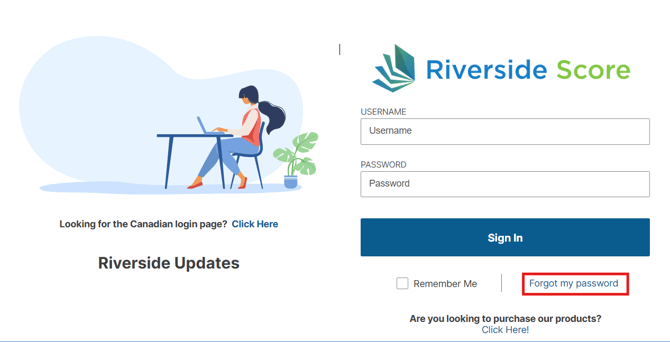
Visit the Riverside Score login page at riversidescore.com. Below the username and password fields, click the “Forgot My Password” link (shown in the screenshot below).
-
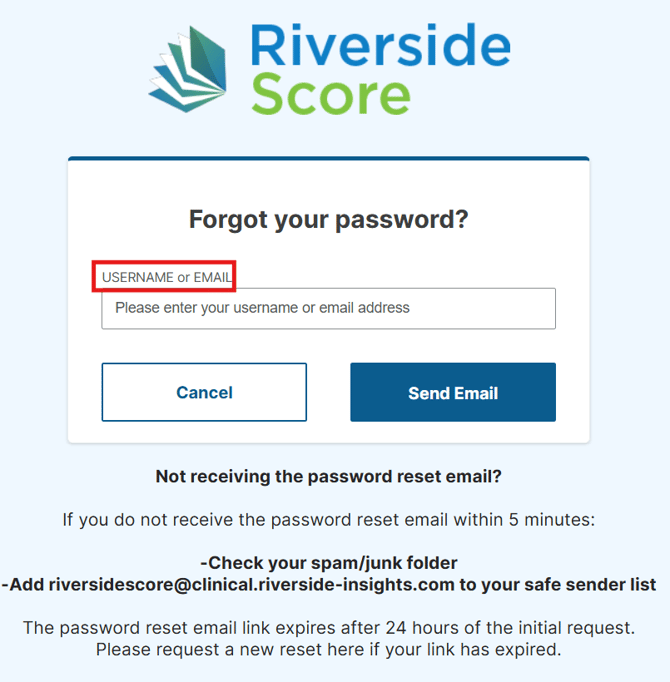
Enter Your Username or Email Address
-
Type your username or email address into the box.
-
Click on "Send Email"
-
-
Check Your Email
-
Riverside Score will send an email to the address you entered.
-
If you don’t see the email, check your spam or junk folder.
-
-
Retrieve Your Username and Reset Password
-
The email will include your username and a link to reset your password.
-
Click the link to update your password securely.
-
Tips for Creating a Secure Password
When resetting your password, ensure it meets the following criteria to be accepted:
-
Use at least 8 characters.
-
Include a mix of uppercase and lowercase letters.
-
Add numbers and special characters (@, #, $, %).
-
Avoid using common words or easily guessable phrases.