
How Do I Change the Confidence Band?
- In the Riverside Score header, click Reports, then click Report Options.

- Select the product you want to update: Woodcock-Johnson IV (WJ IV), Woodcock-Muñoz Language Survey-Revised (WMLS-R), Tests of Early Cognitive and Academic Development (ECAD), or Batería IV.
- On the Scoring Options page, find the Confidence Band section and use the dropdown to select a new value: 68%, 90%, or 95%.
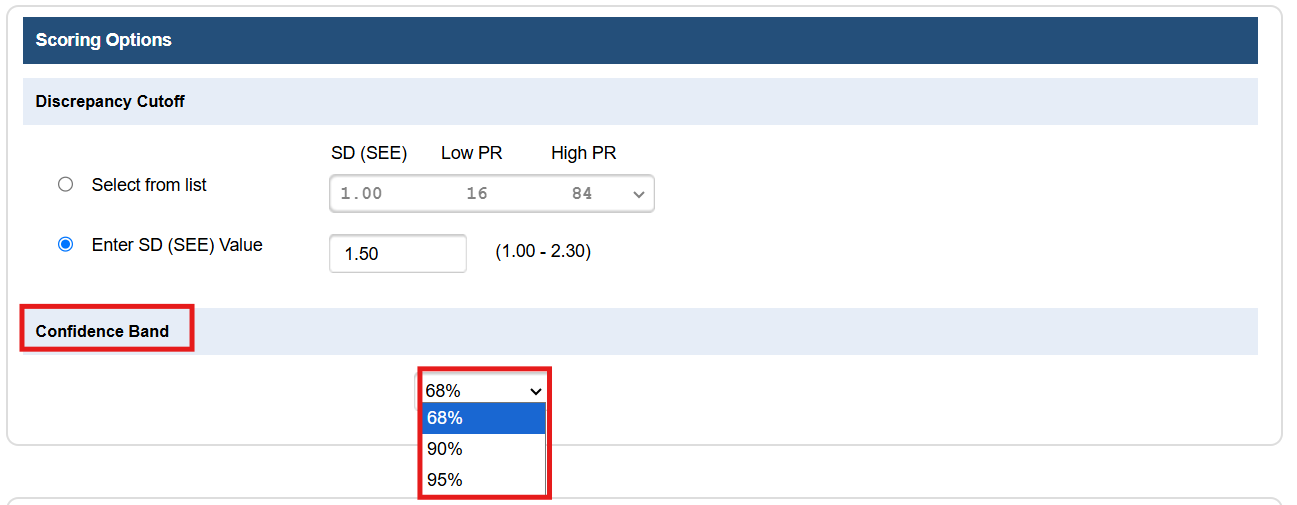
- Click Save.
Which value should I choose?
The confidence band is based on the Standard Error of Measurement (SEM), a statistical estimate of how much error exists in a given score. It's used to show a range of scores around an examinee's obtained score, giving an indication of how much confidence to place in that specific result. A higher percentage (90% or 95%) reflects a wider range of scores and a higher degree of certainty that the examinee's true score falls within it; a lower percentage (68%) reflects a narrower range with somewhat less certainty. 68% is Riverside Insights' recommended default for most score reports.