
Battelle Developmental Inventory, 3rd Edition (BDI-3): How Can I Check My Scoring License/ERF Usage?
Overview
Account Holders in Riverside Score can monitor how their organization's BDI-3 Electronic Record Form (ERF) licenses are being used. This helps ensure accurate tracking of scoring activity across staff and devices.
Steps
-
Log in to Riverside Score as an Account Holder
-
You must have the proper permissions to access organization-level data.
-
-
Navigate to License Information
-
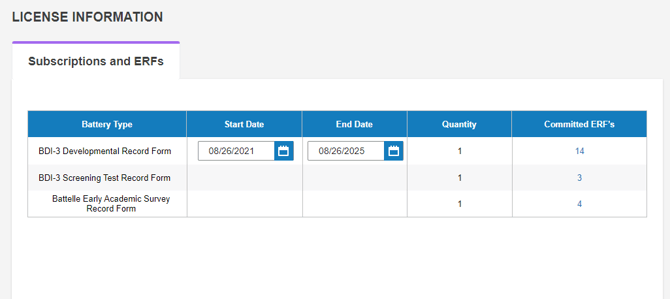
Go to: Organization Management > License Information
-
-
Review ERF Usage
-
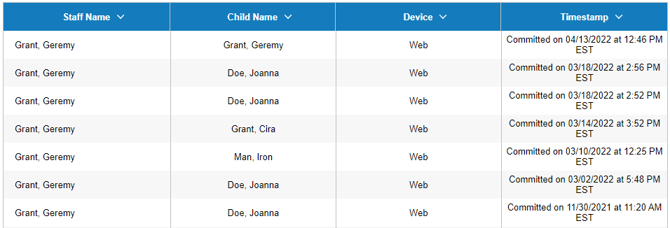
In the "Committed ERF" column, click the hyperlink for any entry to view detailed usage information.
-
-
Details You Can View Include:
-
The examiner or staff member who committed the ERF
-
The examinee or child associated with that license
-
The device used (web browser or Mobile Data Solution)
-
The date and timestamp of usage
-
Additional Notes
-
This data can help resolve discrepancies, monitor license usage trends, and support compliance reporting.
-
Only users with Account Holder access will see the License Information tab.