
Data export
Administrators can export data to an Excel spreadsheet, selecting one or more children whose data they want to export.
To export data:
1. On the menu, click Reports and select Report Center. The Report Center opens on the Create a Report tab.
2. Select Data Export in the Report Type field. The fields for data export appear.
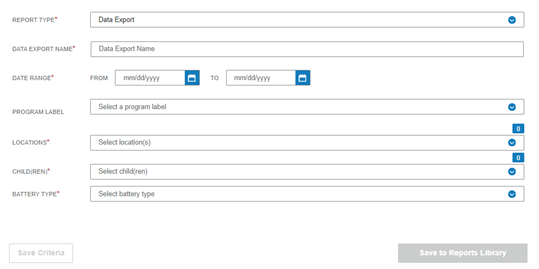
3. Complete the fields.
-Data Export Name – Type a descriptive name for the export.
-Date Range – Select the From and To dates for the data to be exported.
-Program Label (optional) – Select a program label.
-Locations – Select one or more locations
-Children – The children who have data available for the selected locations will be listed. Select the children.
-Battery Type - Select a battery type.
4. Click Save to Report Library. The Report Library opens. The Excel file can be downloaded when the Status column shows Complete.