
Add record forms
To add a Battelle Developmental Inventory, 3rd Edition (BDI-3) record form for a child:
1. Open the Add Record Form window for the child.
The Add Record Form window opens.
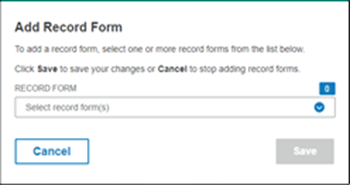
2. Click the down arrow in the Record Form field.
3. Click the check boxes for the record forms you want to add.
4. Click Save.
If you selected one record, that form opens and you can start administering it.
If you added more than one, the Child Information page opens. The added records are listed.