Overview
BDI-3® includes an automatic Age Range Warning to help prevent scoring subdomains that fall outside the valid age range for an examinee. This feature helps ensure accurate assessments based on the child's developmental stage.
Steps
- Start a test session in Riverside Score® for the examinee.
- If you attempt to assess a subdomain that falls outside the child's valid age range:
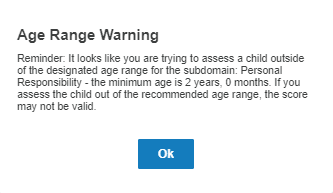
- An Age Range Warning will appear.
- The warning will identify the subdomain and the minimum recommended age.
- It may also include a notice indicating that the resulting scores may be invalid.
3. On the Overview page:
-
-
- Clear all data from the invalid subdomain field(s).
- Click Save at the bottom of the page.
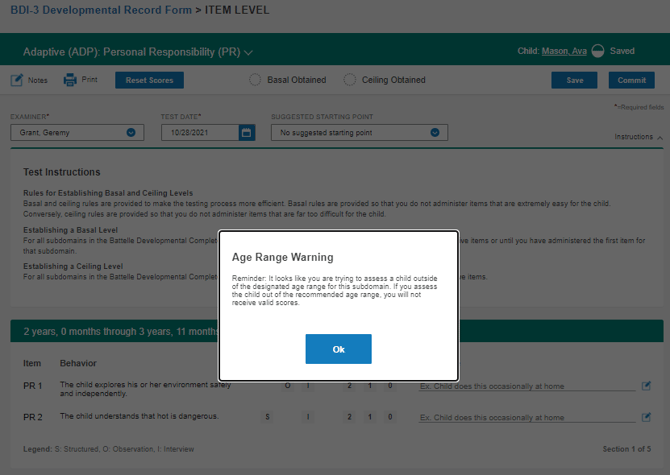
4. At the item level:- Click OK on the warning message.
- Use the top banner's drop-down menu to switch to a valid subdomain.
-
Additional Notes
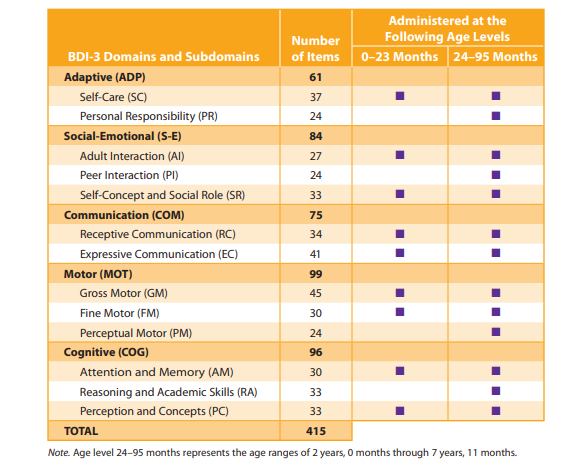
- The Subdomain Age Range Reference Table can be found on page 40 of the BDI-3® Examiner's Manual.
- These warnings help maintain valid and interpretable scores by preventing administration of subdomains that are not appropriate for a child's age.