
1. Sign In to Riverside Score
Start by signing into your Riverside Score account.
2. Check Days Remaining on the Dashboard
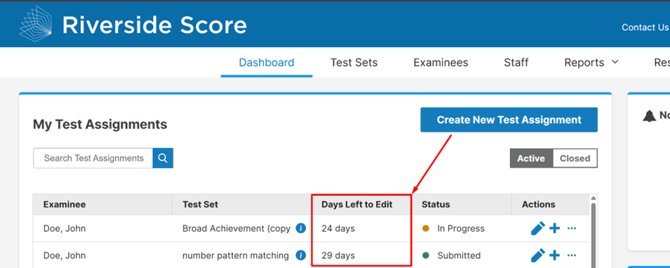
Once signed in, you can view the days left to edit directly on the Dashboard, where all active test assignments are listed.
Each test assignment will display a countdown showing how many days remain before editing closes.
3. View Days Remaining from the Examinee Profile
You can also check this by:
- Searching for an examinee
- Clicking on their name
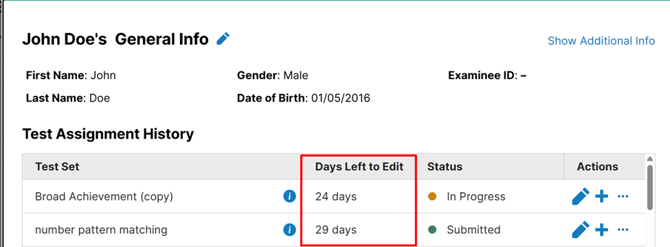
- Viewing their list of test assignments
The remaining days to edit will appear next to each test.
4. Understanding the 30-Day Edit Window
The system provides a 30-day window to edit and update scores after a test assignment is created.
After 30 days:
- The test assignment will automatically move to Closed status.
- You will no longer be able to edit any scores or make changes.
- You can still run reports, even if the test is closed.
⚠️Important Notes
- Be sure to monitor the number of days left so you can complete all scoring and edits before the test closes.
- Only valid, completed tests can be merged. A test becomes a closed test once it is outside of the 30-day editing window.
- The 30-day period begins on the date and time the very first test in that assignment was started, not when the most recent test was administered.
- After 30 days from the start of the first administration, scores can no longer be edited. Test assignments that are closed may still be merged as long as they are within the 30-day window.