
Saved Criteria- edit, delete, load
On the Saved Criteria tab of the Report Center, you can edit, delete, and load the saved criteria.
To open the Saved Criteria tab:
1. On the menu, click Reports and select Report Center. The Report Center opens on the Create a Report tab.
2. Click the Saved Criteria tab.
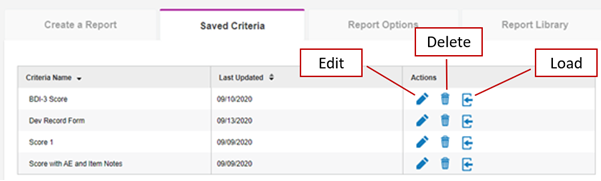
To edit the criteria.
1. Click the Edit icon. The Edit Criteria box opens.
2. Type in the Criteria Name field to update the name.
3. Click the Default Report Criteria check box to change the default status.
4. Click Save. The saved changed appear in the Criteria Name column.
To delete a criteria
1. Click the Delete icon. The Delete Criteria box opens.
2. Click Yes to delete the criteria or No to keep the criteria. If you click Yes, the criteria is deleted from the list.
To load the criteria:
Click the load icon. The Create a Report tab opens. The fields are populated with the saved criteria.