
Save Criteria
You can save criteria for often used reports.
You can save criteria for the Score Report, Family Report, or Data Export.
To save report criteria:
1. On the menu, click Reports and select Report Center. The Report Center opens on the Create a Report tab.
2. Enter the required fields for the report. The Save Criteria button becomes active.

3. Click Save Criteria. The Save Criteria box opens.
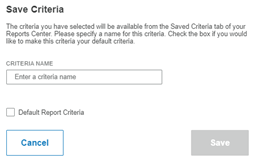
4. Type a name for the criteria in the Criteria Name field
5. If you want to make this criteria the default criteria, click the Default Report Criteria check box.
Note: If you make a saved criteria the default, the default criteria will appear whenever you open the Create a Report tab.
6. Click Save. The criteria is saved. It appears in the list on the Saved Criteria tab.