
Report Library
You can save the Family or Score report to the Report Library. For Data Export, Save to the Report Library is the only option.
The report remains in the library for 30 days.
To save a report to the Report Library:
1. When you run a Family or Score Report. Click Save to Reports Library.

2. The Save to Reports Library box appears.
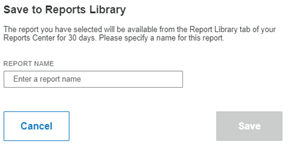
3. Type a name for the report in the Report Name field.
4. Click Save. The Report Library opens with the report listed.
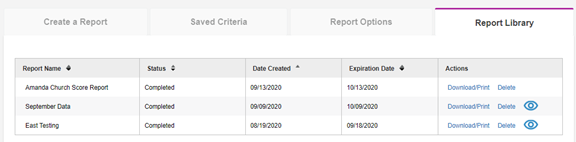
-Report Name - The name you assigned the report.
-Status - Completed when the report has finished downloading.
-Sate Created - The date the report was saved to the library.
-Expiration Date - The date that the report will be removed from the library.
-Actions:
-
Download/Print - Click to:
-
Output the Score or Family in PDF or Word, depending on your Output Format selection.
-
Download a Data Export.
5. Click the icon  to view the format for a data export.