
To add a location:
-
On the Organization Management menu select Locations.
-
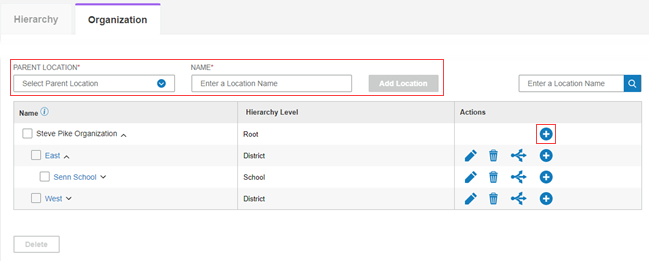
Click the Organization tab. The Organization page appears.
-
There are two ways to add a location to a parent location:
-
In the Parent Location field, select the location to which you want to add the location as a sub level.
-
In the Name field, type the location name.
-
Click the Add Location button. The location is added.
OR
-
Click the add icon on the row of the parent location.
-
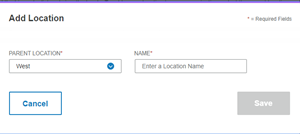
The Add Location window opens.
-
In the Parent Location field, the location on the row which you selected appears. You can select another one.
-
Type the name in the Name field.
-
Click Save to save the new location or Cancel to exit without saving. The location is added.